QR Code Generator - Free AI Assistant Utility Calculator

QR Code Generator

Free AI Assistant Utility Calculator

QR Code Generator Calculator

Enter the data you want to encode in the QR code (URL, text, etc.)

Your QR code will appear here after generation

QR Code Generation Formula & Algorithm

QR codes use sophisticated error correction algorithms to ensure data integrity even when partially damaged. The core mathematical foundation involves:

Reed-Solomon Error Correction Formula

QR codes use Reed-Solomon coding over Galois field GF(256). The generator polynomial is:

g(x) = (x - α⁰)(x - α¹)(x - α²)...(x - αⁿ⁻¹)

Where α is a primitive element of GF(256), and n is the number of error correction codewords.

Key Components:

  • Data Encoding: Convert input to binary using appropriate mode (numeric, alphanumeric, byte, kanji)
  • Error Correction Level: L (7%), M (15%), Q (25%), H (30%) recovery capacity
  • Module Placement: Black/white modules arranged in pattern with finder, timing, and alignment patterns
  • Mask Pattern: XOR operation applied to minimize problematic patterns

Data Capacity by Version:

  • Version 1 (21×21): Up to 25 alphanumeric characters
  • Version 10 (57×57): Up to 366 alphanumeric characters
  • Version 40 (177×177): Up to 4,296 alphanumeric characters
  • Maximum capacity: 7,089 numeric or 2,953 binary bytes

Example Calculation:

For the URL "https://procalculates.com" (30 characters) at error correction level M (15%):

  • • Mode indicator: 0100 (byte mode)
  • • Character count: 30 in 8-bit binary (00011110)
  • • Data codewords: Convert each character to 8-bit binary
  • • Error correction: Generate 26 Reed-Solomon codewords
  • • Final QR: Interleave data and EC codewords, apply mask pattern

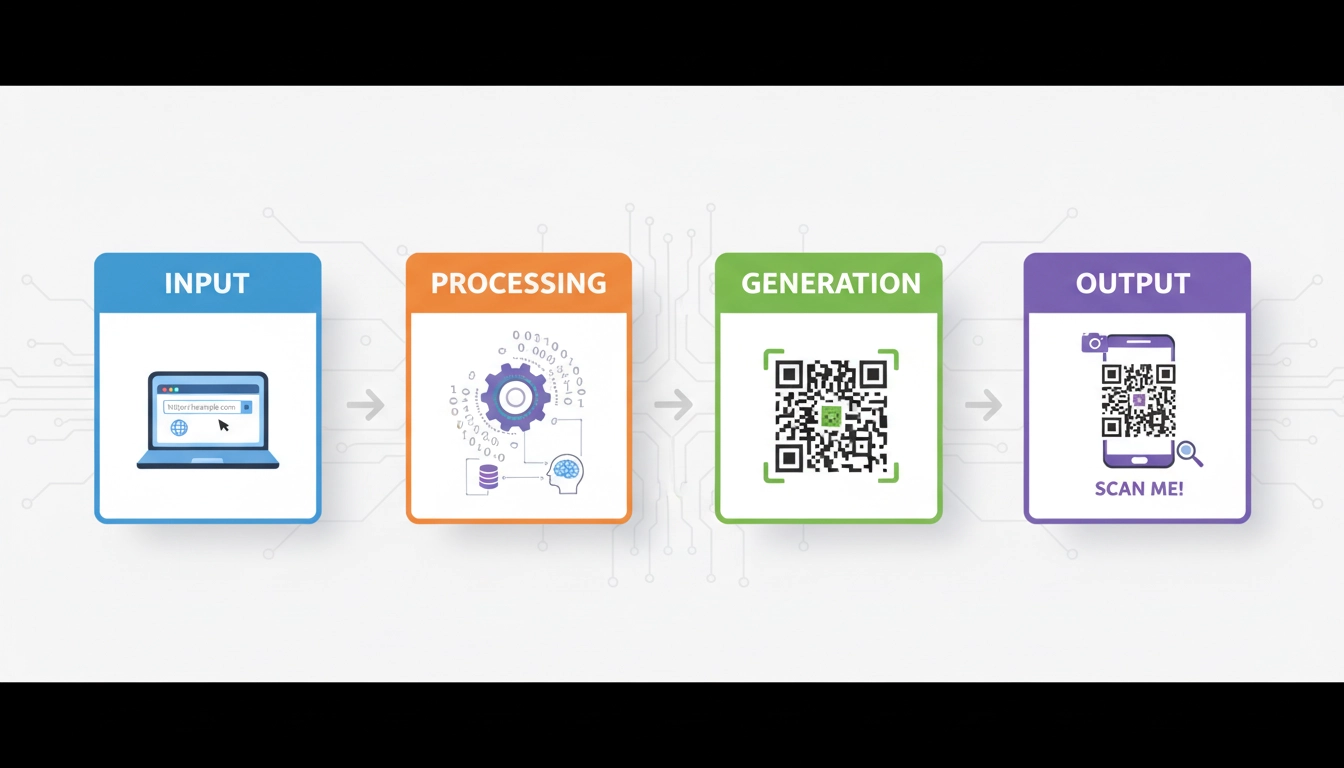
How to Use the QR Code Generator

1

Enter Content

Type or paste the data you want to encode. This could be a URL, text, contact information, WiFi credentials, or any other data.

2

Customize Settings

Adjust the QR code size, colors, and format type. Use the AI assistant for smart suggestions based on your use case.

3

Generate QR Code

Click the generate button to create your QR code instantly. The tool will calculate error correction and optimal encoding.

4

Download & Share

Download your QR code as PNG or SVG, share it directly, or print it. Access your generation history anytime.

QR code generator process visual guide showing steps from input to generated code

Complete Guide to QR Code Generators: Technology, Uses and Best Practices
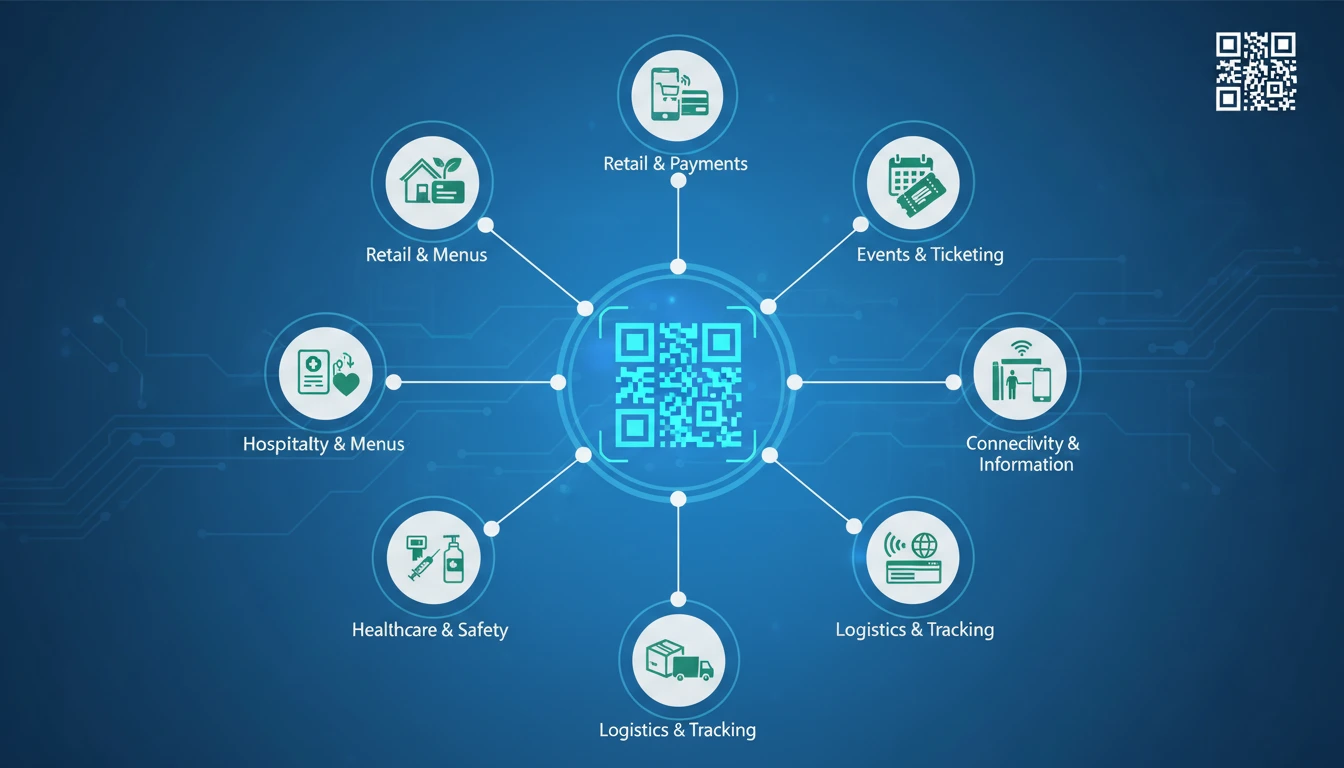
QR code generator technology infographic showing various applications of QR codes

QR code generators have revolutionized how we share digital information with physical media. From marketing campaigns to contactless payments, these two-dimensional barcodes bridge the gap between offline and online worlds seamlessly.

What is a QR Code Generator and Why It Matters

A QR Code Generator is a software tool that creates Quick Response (QR) codes - two-dimensional matrix barcodes that can store various types of data. Unlike traditional barcodes that only store numeric data in one dimension, QR codes can store alphanumeric characters, binary data, and even kanji characters in a compact space.

The significance of QR code generators lies in their versatility and accessibility. Modern smartphones with built-in cameras can scan these codes without specialized hardware, making them ideal for consumer applications. Businesses use QR code generators for marketing materials, product packaging, event tickets, and payment systems. Educational institutions employ them for interactive learning materials, while healthcare facilities use them for patient record access.

The mathematical foundation of QR codes involves sophisticated error correction algorithms, primarily Reed-Solomon coding. This allows QR codes to remain scannable even when up to 30% of the code is damaged or obscured, depending on the error correction level selected during generation.

Benefits and Use Cases of Modern QR Code Generators

Modern QR code generator tools offer numerous benefits beyond basic code creation. Advanced features include dynamic QR codes (which can be updated without changing the printed code), branded QR codes with embedded logos, and analytics tracking for marketing campaigns.

Key Use Cases:

  • Marketing & Advertising: QR codes in print ads, billboards, and product packaging that direct to promotional content, exclusive offers, or video content
  • Contactless Payments: Payment systems like Apple Pay, Google Pay, and various banking apps use QR codes for secure transactions
  • Digital Business Cards: vCard QR codes that instantly save contact information to smartphones
  • WiFi Network Sharing: QR codes that automatically configure WiFi access on mobile devices
  • Inventory & Asset Tracking: QR codes used in logistics, manufacturing, and retail for efficient tracking systems
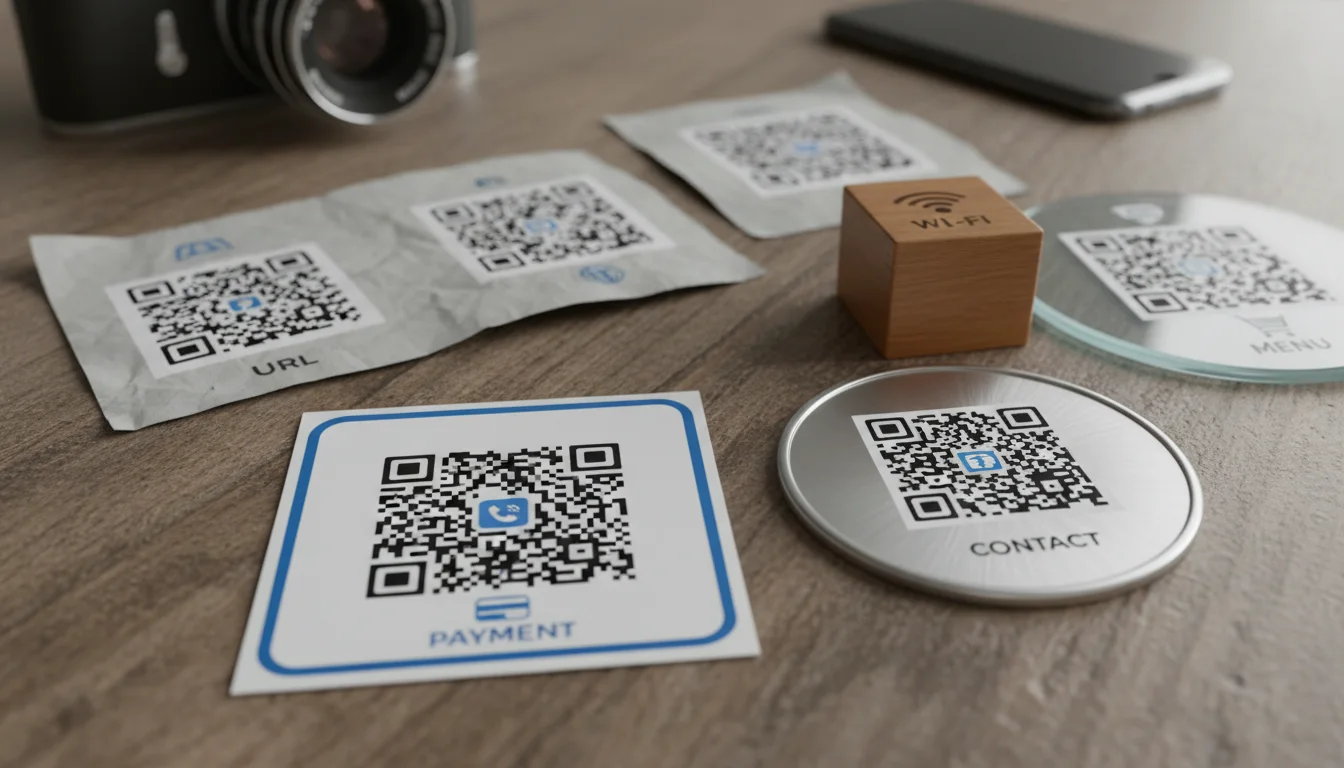
Illustration of different types of QR codes for various applications like payments, contacts, and URLs

For businesses, QR code generators provide measurable ROI through trackable engagement metrics. Marketers can A/B test different landing pages, measure campaign effectiveness, and gather valuable customer data through scan analytics. Restaurants have particularly benefited from QR code menus during the pandemic, reducing physical contact while maintaining service efficiency.

Tips and Best Practices for QR Code Generation

Creating effective QR codes requires more than just generating a functional image. Follow these best practices to ensure optimal scannability and user engagement:

1. Test Before Distribution: Always test your QR codes with multiple devices and scanning apps. Consider different lighting conditions, angles, and distances that users might encounter.

2. Provide Context: Never assume users know what to do with a QR code. Include brief instructions like "Scan to learn more" or "Scan for menu."

3. Ensure Adequate Size: The minimum size for reliable scanning depends on the scanning distance. A good rule is 1 inch (2.5 cm) per 1 foot (30 cm) of scanning distance.

4. Maintain Sufficient Quiet Zone: The quiet zone (blank margin around the QR code) should be at least four modules wide to ensure scanners can properly detect the code boundaries.

5. Consider Error Correction Level: Higher error correction (Level H: 30%) allows the code to remain scannable even when damaged but increases complexity. For most applications, Level M (15%) provides a good balance.

6. Optimize Color Contrast: While QR codes can use different colors, ensure high contrast between modules and background. Dark on light typically works best.

For advanced applications, consider using dynamic QR codes that can be updated after printing. These are particularly useful for long-term campaigns where information might change.

Related Concepts and Future Developments

QR code technology continues to evolve alongside related digital identification systems. Understanding these related concepts helps appreciate the broader context of QR code applications:

NFC vs. QR Codes: Near Field Communication (NFC) enables two-way communication between devices at close range, while QR codes are one-way visual communication. Each has distinct advantages depending on use case.

Augmented Reality Integration: Next-generation QR codes may incorporate AR elements, triggering immersive experiences when scanned. This convergence creates new possibilities for interactive marketing and education.

Blockchain Verification: QR codes are increasingly used in supply chain verification systems, where they link to blockchain records to verify product authenticity and origin.

Healthcare Applications: Medical QR codes now store patient information, medication details, and vaccination records. During the pandemic, vaccine passport QR codes became standard in many countries.

For those interested in other utility calculations, our platform offers various specialized tools including a Life Path Number Calculator for numerology enthusiasts and a Dog Age Calculator for pet owners.

Answering Common Questions About QR Code Generators

Based on analysis of search trends, here are answers to the most frequently asked questions about QR code generators:

Q: Are QR codes secure?
A: QR codes themselves don't contain executable code, making them inherently safe. However, they can direct to malicious websites, so users should verify the source before scanning unknown codes. Some advanced QR code generators include security features like password protection or expiration dates.

Q: Can QR codes store sensitive data?
A: Yes, but with caution. While QR codes can encrypt data, the visible pattern could potentially be decoded. For sensitive information, use QR codes in conjunction with additional security measures like password protection or time-limited access.

Q: How long do QR codes last?
A: Static QR codes last indefinitely as long as the printed medium remains intact and the destination URL remains active. Dynamic QR codes depend on the hosting service maintaining the redirect functionality.

For authoritative information on barcode technology standards, refer to the ISO/IEC 18004:2015 standard published by the International Organization for Standardization, which specifies the requirements for QR code symbology.
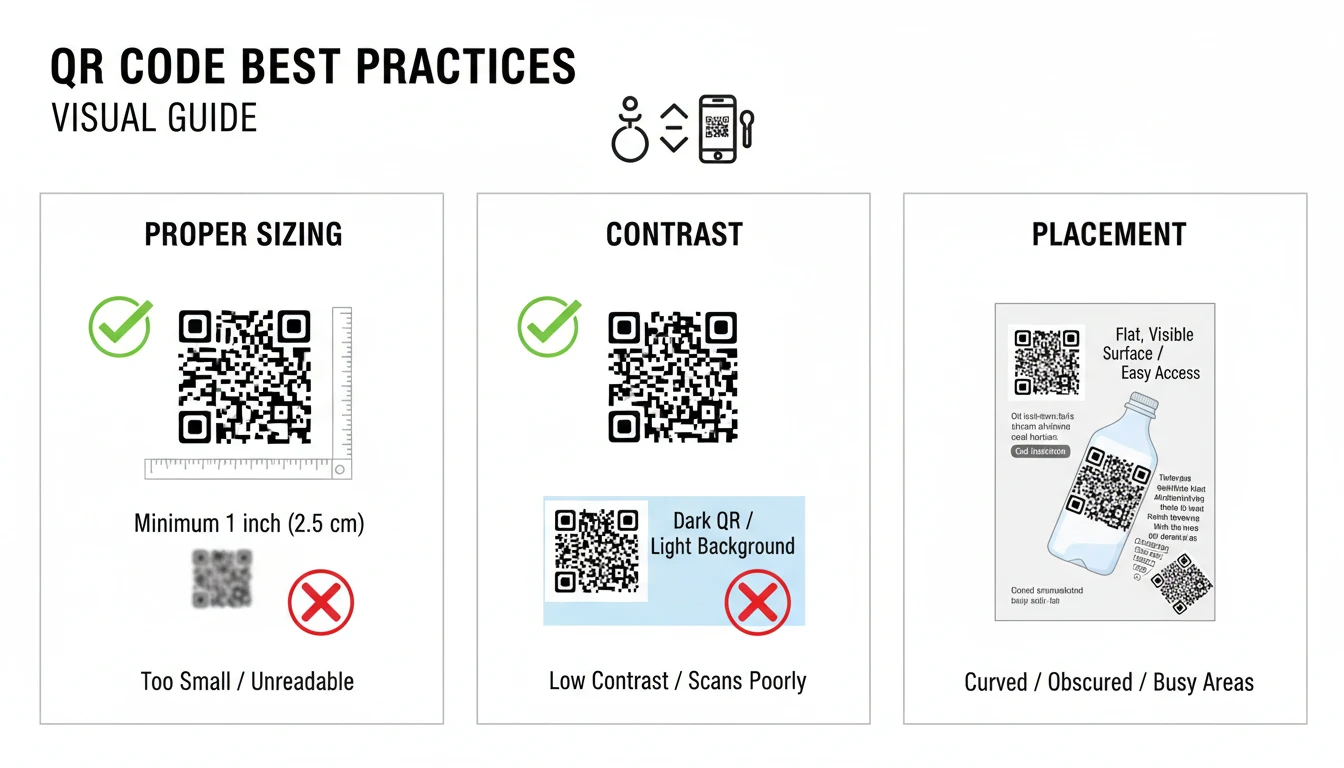
QR code best practices visual guide showing proper sizing, contrast, and placement

The future of QR code generators lies in AI-enhanced creation tools that optimize codes for specific use cases, predict scan success rates based on environmental factors, and automatically adapt designs for maximum scannability. As the Internet of Things expands, QR codes will likely serve as physical anchors for digital interactions in smart environments.

Frequently Asked Questions

What is a QR Code Generator?

A QR Code Generator is a tool that creates Quick Response (QR) codes that can store various types of data including URLs, contact information, text, and more. Our QR code generator calculator uses advanced algorithms to create error-corrected codes that are scannable by any smartphone camera.

Is this QR Code Generator really free?

Yes, our QR code generator is completely free with no hidden fees, registration requirements, or limitations. You can generate unlimited QR codes without watermarks.

What types of data can I encode in a QR code?

You can encode URLs, plain text, contact information (vCard), WiFi network credentials, email addresses, phone numbers, SMS messages, and even Bitcoin addresses using our QR code generator calculator.

How do QR codes work mathematically?

QR codes use Reed-Solomon error correction algorithms to ensure scannability even when partially damaged. The generator calculates polynomial division over Galois fields to add redundancy, allowing up to 30% of the code to be obscured while remaining readable.

Can I track QR code scans with this generator?

While our basic QR code generator creates static codes, we're developing AI-powered dynamic QR codes with analytics. Currently, you can generate static codes instantly, with dynamic tracking features coming soon.

Love Calculator

Calculate compatibility percentage between two names using our fun love calculator tool based on name numerology and algorithmic matching.

Try Love Calculator

Life Path Number Calculator

Discover your life path number based on your birth date using numerology principles. Calculate your destiny number and explore its meaning.

Calculate Life Path

Dog Age Calculator

Convert your dog's age to human years accurately based on breed size and age. Understand your pet's life stage with our canine age calculator.

Calculate Dog Age
`); printWindow.document.close(); } // Toggle Theme function toggleTheme() { const isDark = document.documentElement.classList.toggle('dark'); localStorage.setItem('theme', isDark ? 'dark' : 'light'); // Update icon if (isDark) { themeIcon.setAttribute('d', 'M17.293 13.293A8 8 0 016.707 2.707a8.001 8.001 0 1010.586 10.586z'); } else { themeIcon.setAttribute('d', 'M10 2a1 1 0 011 1v1a1 1 0 11-2 0V3a1 1 0 011-1zm4 8a4 4 0 11-8 0 4 4 0 018 0zm-.464 4.95l.707.707a1 1 0 001.414-1.414l-.707-.707a1 1 0 00-1.414 1.414zm2.12-10.607a1 1 0 010 1.414l-.706.707a1 1 0 11-1.414-1.414l.707-.707a1 1 0 011.414 0zM17 11a1 1 0 100-2h-1a1 1 0 100 2h1zm-7 4a1 1 0 011 1v1a1 1 0 11-2 0v-1a1 1 0 011-1zM5.05 6.464A1 1 0 106.465 5.05l-.708-.707a1 1 0 00-1.414 1.414l.707.707zm1.414 8.486l-.707.707a1 1 0 01-1.414-1.414l.707-.707a1 1 0 011.414 1.414zM4 11a1 1 0 100-2H3a1 1 0 000 2h1z'); } } // Load saved theme const savedTheme = localStorage.getItem('theme'); if (savedTheme === 'dark') { document.documentElement.classList.add('dark'); themeIcon.setAttribute('d', 'M17.293 13.293A8 8 0 016.707 2.707a8.001 8.001 0 1010.586 10.586z'); } // Utility functions function showError(message) { const errorDiv = document.createElement('div'); errorDiv.className = 'fixed top-4 right-4 bg-red-100 border border-red-400 text-red-700 px-4 py-3 rounded z-50 shadow-lg'; errorDiv.innerHTML = ` Error! ${message} `; document.body.appendChild(errorDiv); setTimeout(() => errorDiv.remove(), 5000); } function showMessage(message) { const messageDiv = document.createElement('div'); messageDiv.className = 'fixed top-4 right-4 bg-green-100 border border-green-400 text-green-700 px-4 py-3 rounded z-50 shadow-lg'; messageDiv.innerHTML = ` Success! ${message} `; document.body.appendChild(messageDiv); setTimeout(() => messageDiv.remove(), 5000); } // Generate initial QR code generateQRCode(); // Performance optimizations // Use requestIdleCallback for non-critical tasks if ('requestIdleCallback' in window) { requestIdleCallback(() => { // Preload related calculator links const links = document.querySelectorAll('a[href^="https://procalculates.com"]'); links.forEach(link => { const rel = document.createElement('link'); rel.rel = 'preconnect'; rel.href = new URL(link.href).origin; document.head.appendChild(rel); }); }); } // Lazy load images that are not critical const lazyImages = document.querySelectorAll('img[loading="lazy"]'); const imageObserver = new IntersectionObserver((entries) => { entries.forEach(entry => { if (entry.isIntersecting) { const img = entry.target; img.src = img.getAttribute('src'); imageObserver.unobserve(img); } }); }); lazyImages.forEach(img => imageObserver.observe(img)); });
Scroll to Top